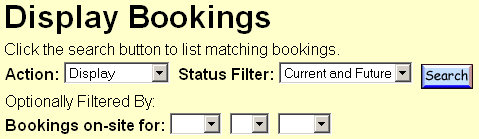
Booking Status Filter HelpThe Booking Status Filter may be used to narrow the listing of bookings based on specific criteria.
Each of the pulldown menus is explained below. Action:To indicate whether to display bookings or to modify them, choose one of the following options from the Action menu:
Status Filter:To select specific orders to view or modify, choose one of the following options from the Status Filter menu:
Bookings on-site for:To select bookings scheduled to be on-site on a particular date, choose the specific month, day and year from the menus. Note: Medianet ensures only bookings that meet the eligibility requirements of the selected action are included on the results page. For example, if Cancel action is selected, bookings that are already on-site are excluded, even if the status filter Out Now is also selected. | ||